The upcoming Bor v0.10.0 release will add a Disk encryption policy type: managed LUKS2 full-disk encryption for the whole fleet. It verifies that the volumes that should be encrypted actually are, enrolls unattended unlocking through the TPM 2.0 chip and Tang network servers, and escrows a per-volume recovery key on the Bor server - the role Active Directory plays for BitLocker on Windows, now for Linux desktops.
This post walks through what will ship and the security design behind it.
Encrypting a disk was never the hard part
Every Linux installer has offered LUKS encryption for two decades. The hard part is operating it across a few hundred machines: who unlocks a laptop after a firmware update changes the TPM measurements? What does the help desk do for a user stuck at the boot prompt on a Sunday? Which machines are actually encrypted, and with what cipher?
The stock building blocks each solve one piece. systemd-cryptenroll binds a keyslot to the TPM; Clevis and Tang give network-bound unlocking; but neither has a recovery story beyond “whatever passphrase the installer set”, and neither can tell you anything about the fleet. Bor v0.10.0 will close that gap by orchestrating the standard tools - cryptsetup, systemd-cryptenroll, clevis - and adding the two things they miss: an escrowed, audited, rotated recovery key per volume, and a single place to see and manage all of it.
Protectors, not passphrases
LUKS2 encrypts the data with one random volume key; up to 32 keyslots each hold a copy of that key under a different credential, and any one of them unlocks the disk. Borrowing BitLocker’s vocabulary, each managed keyslot is a protector. A Bor-managed system volume typically ends up with four:
| Protector | Unlocks when | Managed with |
|---|---|---|
| TPM 2.0 | The measured boot state (PCRs) is unchanged - firmware, Secure Boot and boot chain intact | systemd-cryptenroll |
| Tang | The machine can reach the configured Tang server(s) at boot | clevis luks bind, pinned signing keys |
| Recovery key | A human types the 64-character key at the boot prompt | Generated by the agent, escrowed on the Bor server |
| User passphrase | The user types their passphrase | Not managed; left in place |
The protectors are independent: adding or rotating one never changes the volume key or touches the others, and the machine stays bootable through every operation Bor performs. The daily-driver case is TPM 2.0 - the disk unlocks with no prompt while the boot chain is intact. Tang covers desktops that should only unlock on the corporate network, and doubles as the automatic fallback when a firmware update changes the PCRs. The recovery key is the last resort for everything else, and the reason an enterprise can deploy FDE at all: without a recovery story, encryption at scale turns into data-loss tickets.
A recovery-key directory for the fleet
The new Disk Encryption page is the fleet view: how many volumes are escrowed, which rotations are pending, and - from day one - how many mounts are not encrypted at all. Agents report their LUKS inventory on every connect even before any Disk encryption policy exists, so the “are we actually encrypted?” question is answered before you enforce anything.
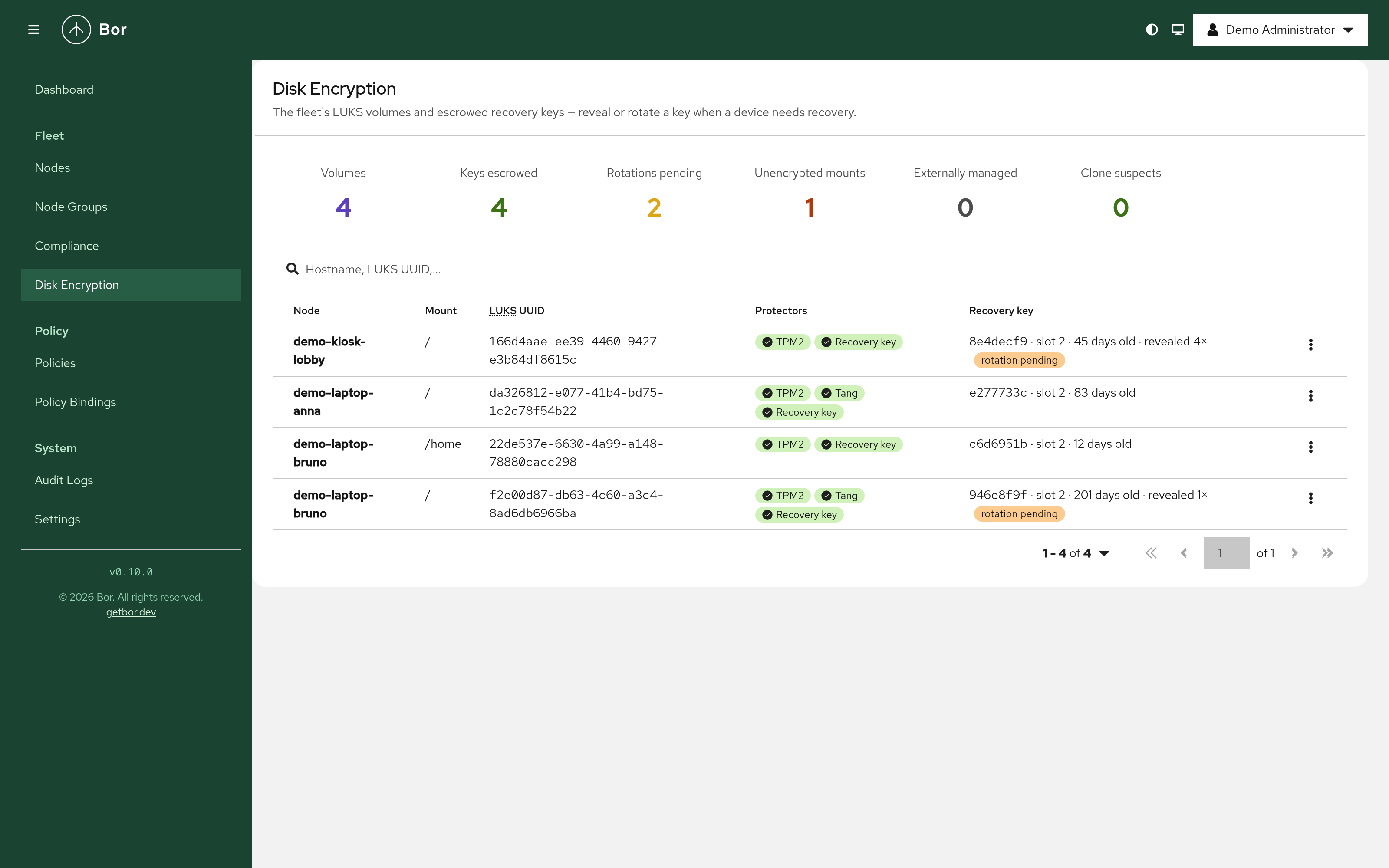
The search box is tuned for what a help-desk call actually provides: hostname, the LUKS UUID read off the boot prompt, a key-ID prefix, with or without dashes. Revealing a key is deliberately heavier than any other action in Bor:
- it needs its own permission (
disk_encryption:reveal, granted to Super Admin only by default); - a reason or ticket number, stored in the audit event;
- a step-up re-authentication - your password, plus your TOTP code when enrolled. The step-up token is single-use and valid for five minutes, so possession of a logged-in browser session alone is not enough;
- the reveal is a high-severity audit event, the response is never cached, and the key is hidden again after two minutes.
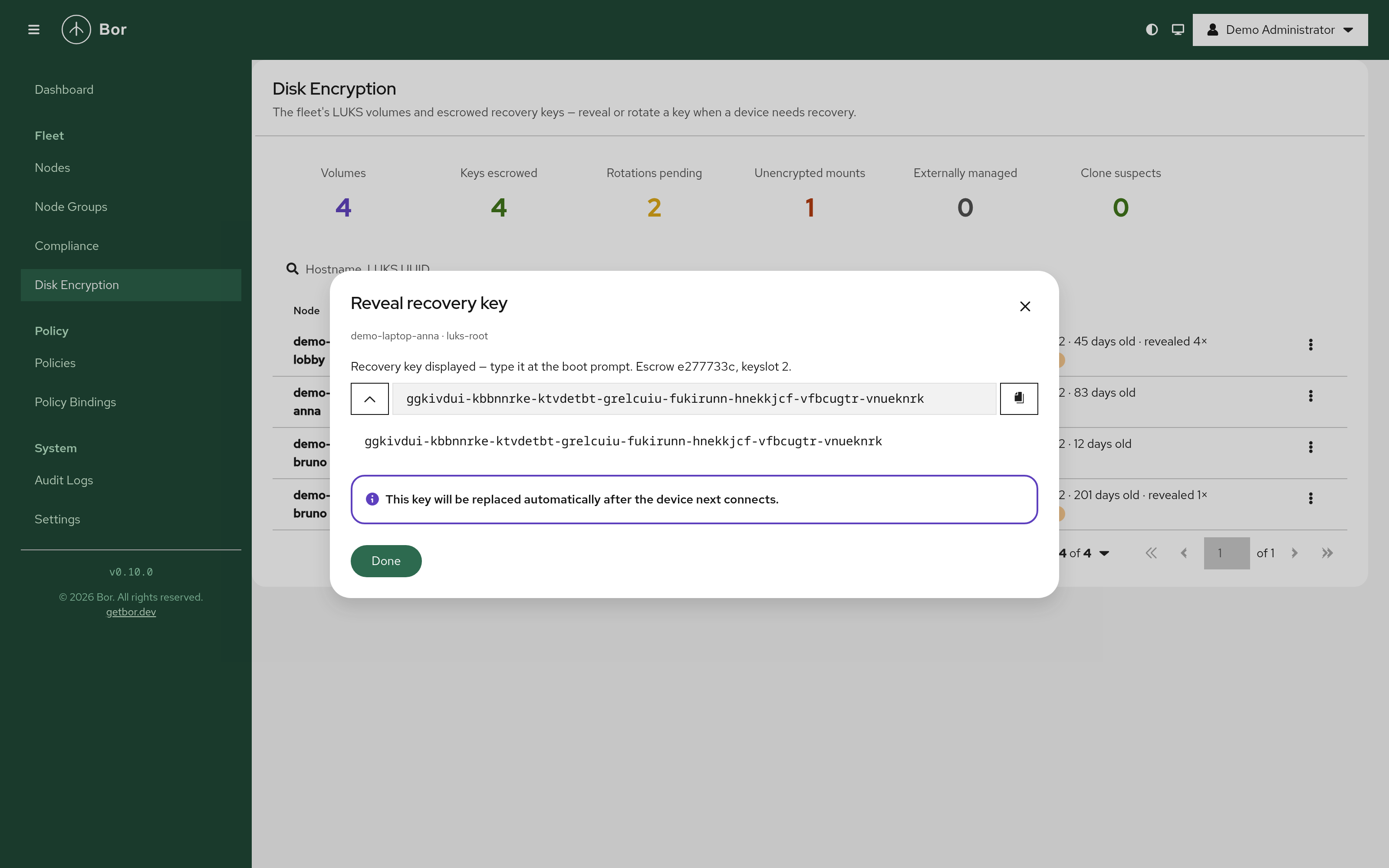
By default a revealed key does not stay valid: once the machine reconnects, the agent escrows a fresh key and wipes the old slot - a key that was ever spoken aloud gets replaced. Rotation also runs on a policy schedule (180 days by default), on demand from the UI, and automatically when the server detects drift.
The policy
The editor is organised as requirements, three protector cards and an advanced section, with a live preview of the keyslot layout the policy produces:
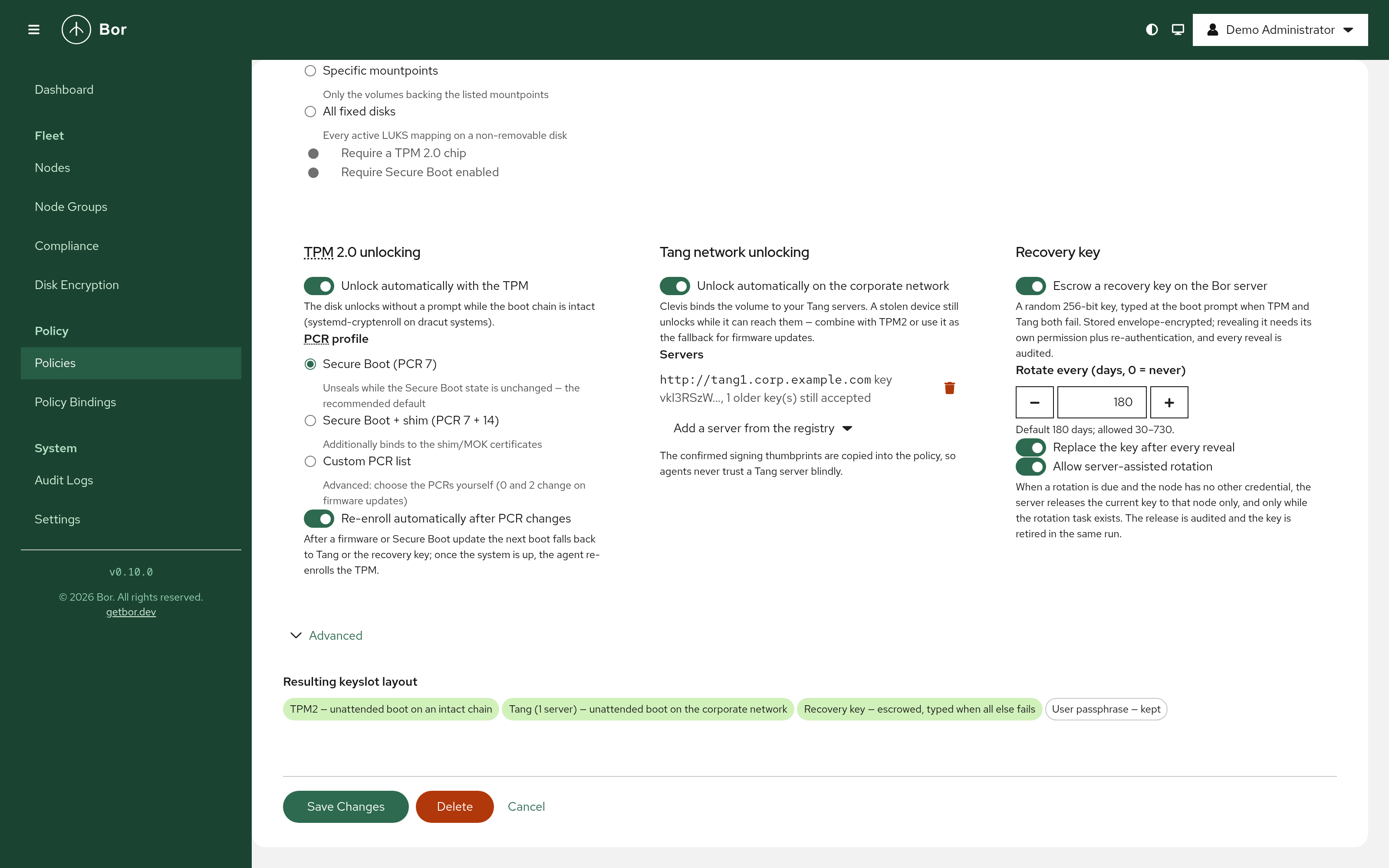
A few decisions worth calling out:
- Bor never encrypts a disk in place. Requiring encryption reports an unencrypted volume as non-compliant; the remedy is provisioning the machine encrypted. In-place re-encryption of a running system is how fleets lose data, so it is out of scope on purpose.
- TPM enrollments use explicit PCR profiles - Secure Boot (PCR 7) by default, optionally + shim (PCR 14), or a custom list. With auto-reseal on, a firmware update is a non-event: the next boot falls back to Tang or the recovery key, and once the system is up the agent re-enrolls the TPM and audits it. Machines whose TPM is already owned by another FDE stack (Ubuntu’s snapd FDE, openSUSE
sdbootutil, pcrlock setups) are detected and reported as externally managed - Bor never competes with them. - Tang servers carry pinned thumbprints. The signing keys you confirmed in the registry are copied into the policy, so the policy is self-contained and exportable, and agents refuse keys no admin ever verified. With several servers, a threshold selects how many must be reachable.
- Existing setups adopt cleanly. Fleets already using Clevis/Tang adopt with no interaction at all - the existing binding is used as the unlock credential to add the escrowed recovery key. New installs drop a one-time bootstrap key from Kickstart or autoinstall, consumed and wiped on first sync. And for the long tail there is
sudo bor-agent luks adopt: type the current passphrase once, done.
When several Disk encryption policies bind to one node, the safety-relevant switches (require encryption, escrow) are OR-ed, the rotation interval takes the smallest value, and Tang server lists are deliberately not merged - a union would silently widen who can unlock the disk.
Security design
The design follows three rules:
- The Bor server is never in the boot path. Unlocking at boot is done entirely by the initramfs: the TPM unseals, Clevis contacts Tang, or the user types the recovery key. A Bor outage never prevents a machine from booting - and compromising the server does not hand out keys “on every boot”, the failure mode of vault-in-the-boot-path designs.
- Escrow first, always. A recovery key is stored on the server before its keyslot is created on disk, and an old keyslot is wiped only after the server confirms the new one. At no point does a recovery slot exist whose secret the server does not hold. Progress (never keys) is persisted, so a crash mid-rotation resumes cleanly.
- The standard tools do the cryptography. The agent drives
cryptsetup,systemd-cryptenrollandcleviswith fixed, validated arguments, and secrets pass to them exclusively through stdin and an inherited pipe - never through command lines, files or the environment. The only secret Bor generates is the recovery key itself (kernel CSPRNG, same format assystemd-cryptenroll --recovery-key, so boot prompts look exactly as documented everywhere).
Escrowed keys are stored envelope-encrypted: a fresh AES-256-GCM key per record, wrapped by a master key (KEK) read from a file that lives outside the database. A stolen database dump is useless without the KEK file and vice versa; deleting a key is crypto-shredding. The KEK can be rotated online, and without a configured KEK the escrow refuses to operate rather than degrade.
The server also watches for what it cannot see directly. Every keyslot has a fingerprint derived from the volume UUID, slot index and the slot’s random KDF salt - no key material involved. If the fingerprint of an escrowed key disappears from a node’s inventory, the escrowed key no longer opens that disk (someone re-keyed it, or restored an old header backup): Bor raises a drift audit event and schedules a rotation. Two nodes reporting the same LUKS UUID - cloned golden images sharing one volume key - are flagged as clone suspects.
Just as deliberately, the documentation spells out what the design does not defend against: rotating a keyslot is not revocation (anyone who copied the header and an old key retains access - only re-encryption revokes), and Tang trusts the network by design (a stolen device still unlocks while it can reach the Tang server - place Tang accordingly).
Tang, operated like a fleet service
Tang’s trust model is trust-on-first-use, and stock Clevis makes it easy to get wrong (clevis luks bind -y skips key verification entirely). Bor makes the trust explicit and human-verified: registering a server fetches its advertisement and shows the signing-key thumbprints, which you compare against tang-show-keys on the Tang host before confirming. Agents only ever bind to keys an admin confirmed.
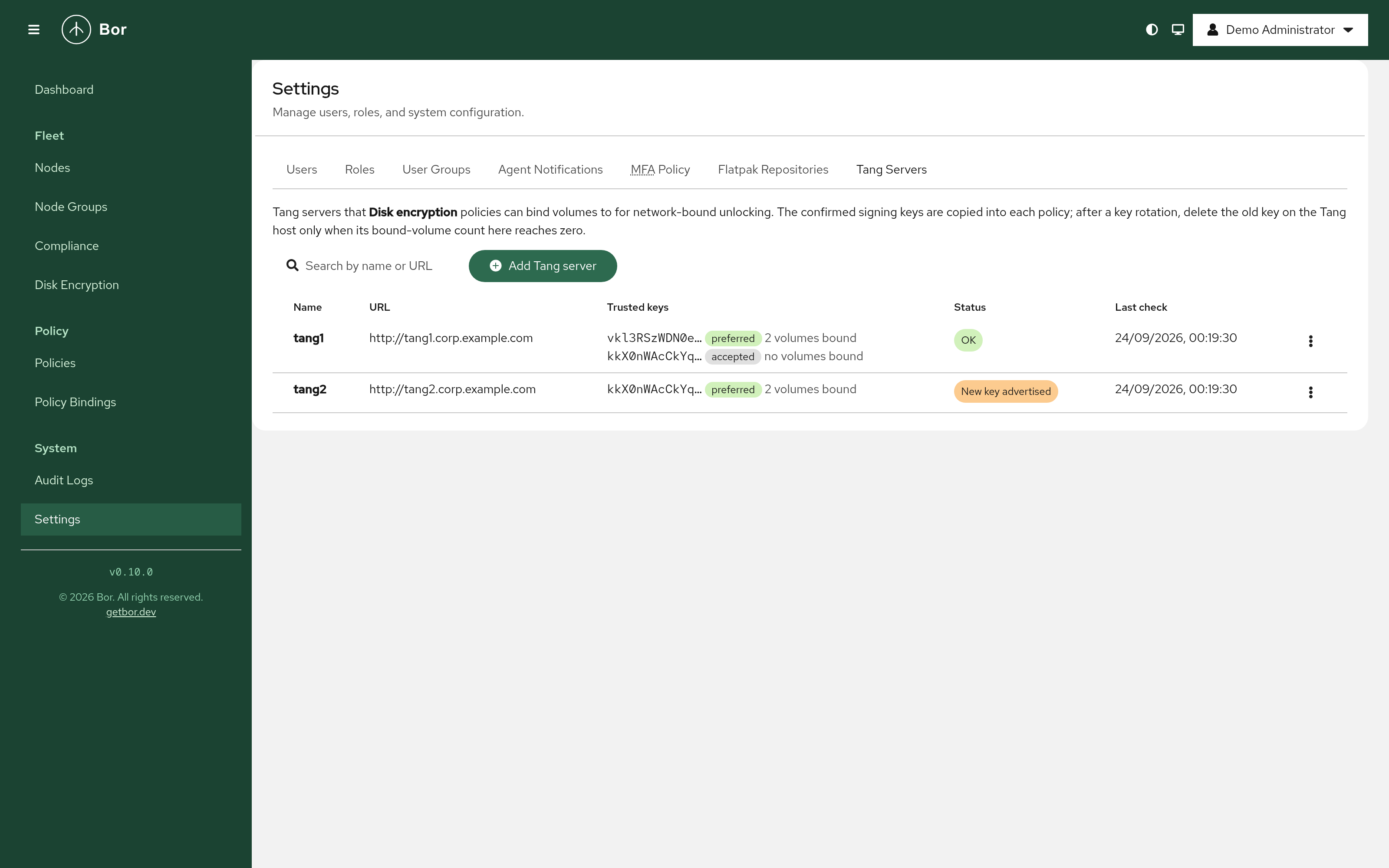
The registry also answers the question stock NBDE cannot: when is it safe to delete the old Tang keys? After rotating keys on the Tang host, Bor flags the server as “New key advertised”; once you confirm the new thumbprint, agents re-bind every volume (bind to the new key, verify end-to-end, then remove the stale binding). The bound-volumes count per signing key shows exactly when the old key’s count reaches zero and its files can be removed.
Audit and observability
Every sensitive operation emits a structured audit event with CEF/OCSF export: reveals and denied reveals, server-assisted key releases (with an alert if a released key is never confirmed), drift and clone detection, TPM re-enrollments and Tang key changes. Reveal events carry the actor, volume, escrow ID and the stated reason. New Prometheus metrics cover escrowed volumes, overdue rotations, escrow operations and reveal counts, so the compliance dashboard question - “every volume encrypted, escrowed and rotated on schedule” - is answerable by a scrape.
What you need on the nodes
cryptsetup >= 2.4 covers inventory, compliance and recovery-key escrow everywhere. The TPM 2.0 protector needs systemd-cryptenroll on a dracut-based system (Fedora, RHEL 9/10, openSUSE, Ubuntu >= 25.10); the Tang protector needs clevis-luks and clevis-dracut. Debian and older Ubuntu systems using initramfs-tools get inventory and recovery-key escrow now, with their TPM2/Tang boot path planned for a later release. The agent packages declare all of this as recommends/suggests.
On the server side, escrow is enabled by pointing BOR_ESCROW_KEK_FILE at a 32-byte key file; MFA-gated reveals, retention windows for rotated-away and orphaned keys, and KEK rotation are all configurable. Notably, decommissioning a node does not delete its keys - a disk in a drawer may still need recovery, so orphaned keys survive for a configurable retention period. This differs from Active Directory, where deleting the computer object silently deletes its BitLocker keys.
Availability
The Disk encryption policy type will ship in Bor v0.10.0 together with the Tang server registry, the step-up authentication endpoint and the new fleet page. The full operator guide - architecture, adoption paths, help-desk runbook, troubleshooting and the complete configuration reference - will be published with the release as docs/disk-encryption.md. Packages for all supported distributions will be on the Download page with the release.