Bor v0.9.0 is out. This release adds two new policy types - Session Access and Flatpak - and turns every Bor server into a distribution point for its own agent packages, with a copy-paste deploy wizard. Policies can now be exported and imported as YAML bundles, and creating a policy is a guided four-step wizard. The complete changelog is on the GitHub release page.
Thank you, Hacker News !
Shortly after v0.8.0 shipped, the release post went up on Hacker News as a Show HN and spent a while at the top of the front page. The thread brought a lot of good questions - push versus pull delivery, how locked settings survive a curious user, mTLS versus SSH, what happens when two policies touch the same key - and one feature request that became the headline feature of this release. jimmcslim asked whether Bor could enforce “screen time” on laptops given to children, hopefully more effectively than the built-in equivalents on iOS and Android.
Session Access policy type
The new SessionAccess policy type controls when selected users or groups may use a desktop session: a school computer lab usable only during school hours, a kiosk restricted to business hours, contractor accounts limited to their working window - or a child’s laptop after bedtime.
- Weekly schedules per user or group: allowed time windows by day, in node-local time, with windows that cross midnight (
22:00–02:00). - Two enforcement layers. Layer 1 (logind, always on) - as an allowed window ends, the agent warns the user (default 30, 15 and 5 minutes, the final warning bypassing do-not-disturb) and then locks the screen (applications keep running) or logs off the session, per rule. A re-lock watchdog keeps a session locked outside its allowed hours. Layer 2 (
pam_time, optional) - blocks fresh logins outside the allowed hours by managing a marked block in/etc/security/time.confand enablingpam_timein the account stack, optionally for SSH as well. The block encodes the full weekly schedule, so it keeps enforcing even while the agent is not running. - Distro-aware PAM. On Debian/Ubuntu the agent enables
pam_timeautomatically viapam-auth-update. On authselect-managed Fedora/RHEL it reports a degraded compliance state with a documented one-time admin step, while Layer 1 still enforces. - Lockout guard rails.
rootis never restricted, thetime.confblock is written atomically with a self-check and is tamper-protected, and unbinding the policy removes all PAM artifacts fail-open. - Web UI. A dedicated editor with per-rule user and group lists, a day-and-time window builder, lock/log-off selection, warning thresholds, the PAM and SSH switches, and a node-requirements info box.
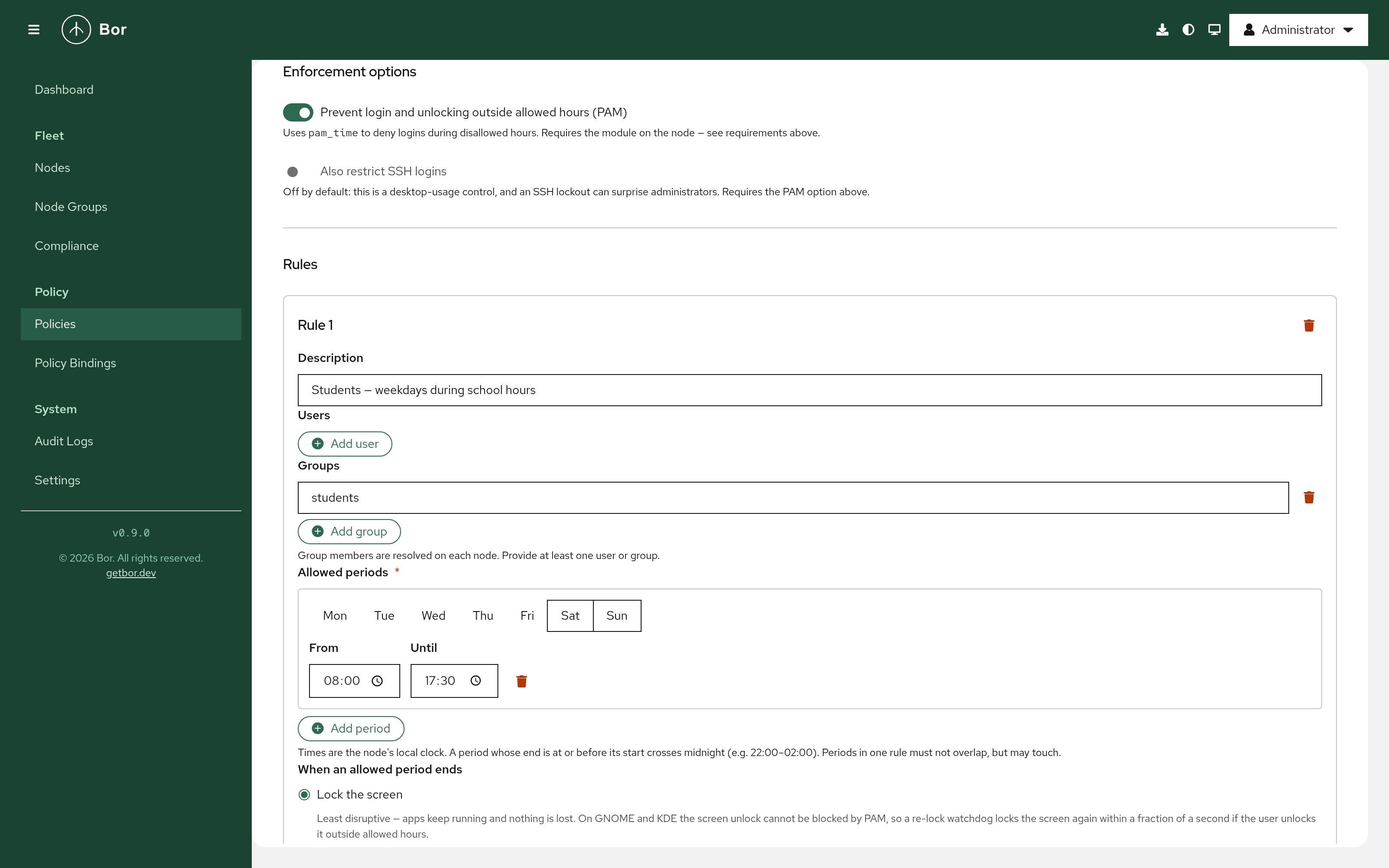
One limitation, by design: on GNOME and KDE the screen unlock is enforced by the Layer-1 watchdog, not by PAM, because the desktop lockers do not honour the PAM account phase on unlock. For the strictest restriction, combine the Log off end action with PAM - returning then requires a fresh login, which PAM denies outside the allowed hours. The Session Access guide covers the full behaviour, node requirements, and break-glass recovery.
Flatpak policy type and application catalog
The new Flatpak policy type manages Flatpak remotes and applications on managed desktops, backed by a server-side application catalog.
- Remotes - any number of Flatpak remotes per policy: URL, GPG key, subset such as Flathub’s
verified, allow-/deny-list filters, priority, enabled state. Definitions are written to/etc/bor/flatpak/and tamper-protected. An existing remote such as a distribution-providedflathubis adopted rather than duplicated, and restored on unbind. - Applications - desired state Present, Latest or Absent per app, with remote, branch, optional and delete data flags. The agent drives the
flatpakCLI idempotently, off the policy stream, with per-operation timeouts (default 30 minutes), and reports one compliance item per remote and per application. - Updates - optional periodic
flatpak updateand unused-runtime cleanup. - Not applicable when Flatpak is absent - nodes without
flatpakreport the policy as Inapplicable, like other unsupported subsystems. - Catalog (Settings → Flatpak repositories) - Flathub is indexed out of the box from its AppStream feed. Additional repositories can be added from a
.flatpakrepoURL or manually, refreshed on a schedule or by uploading anappstream.xml.gzfor air-gapped servers. The policy editor searches the catalog and copies remote definitions into the policy, so policies stay self-contained.
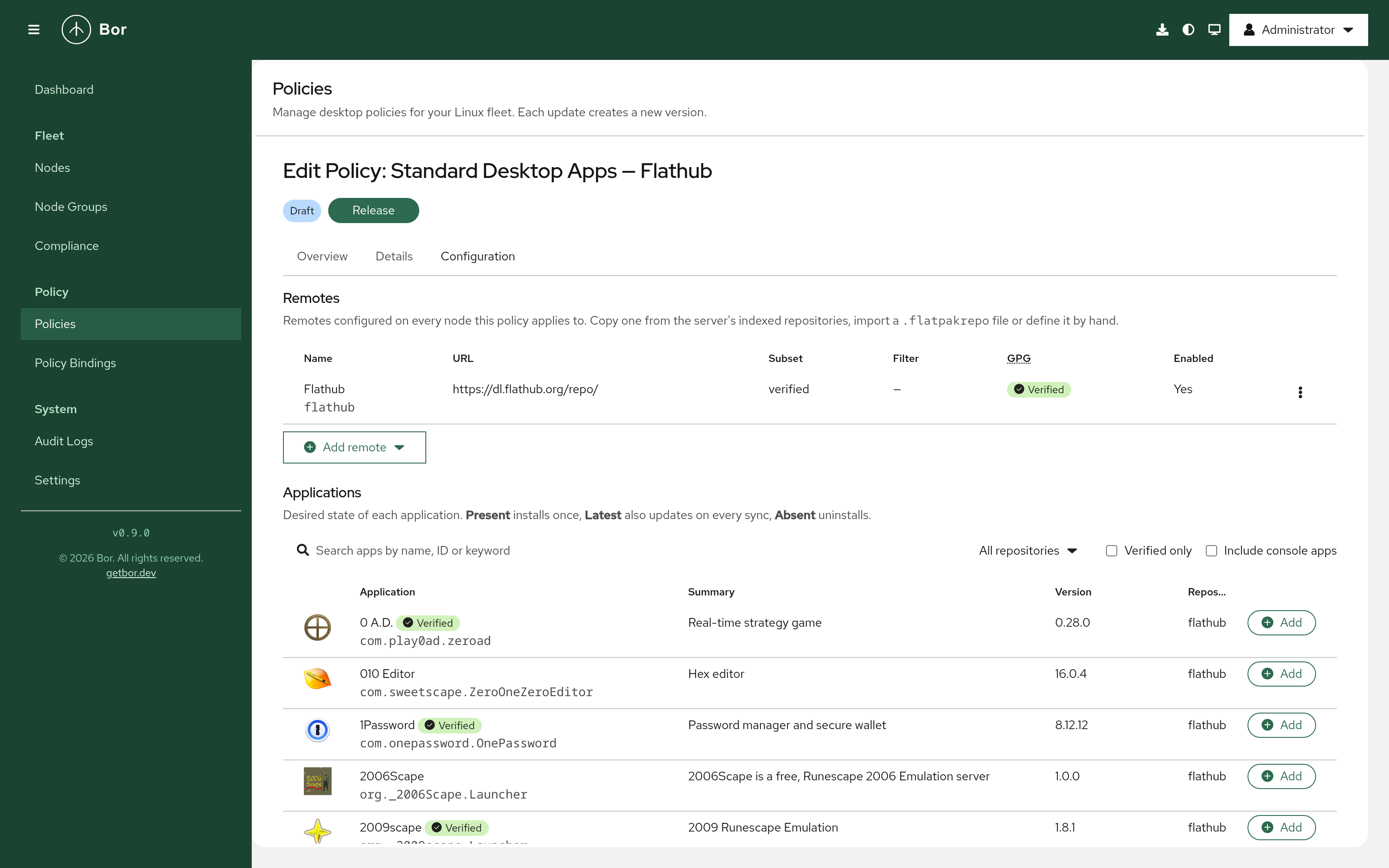
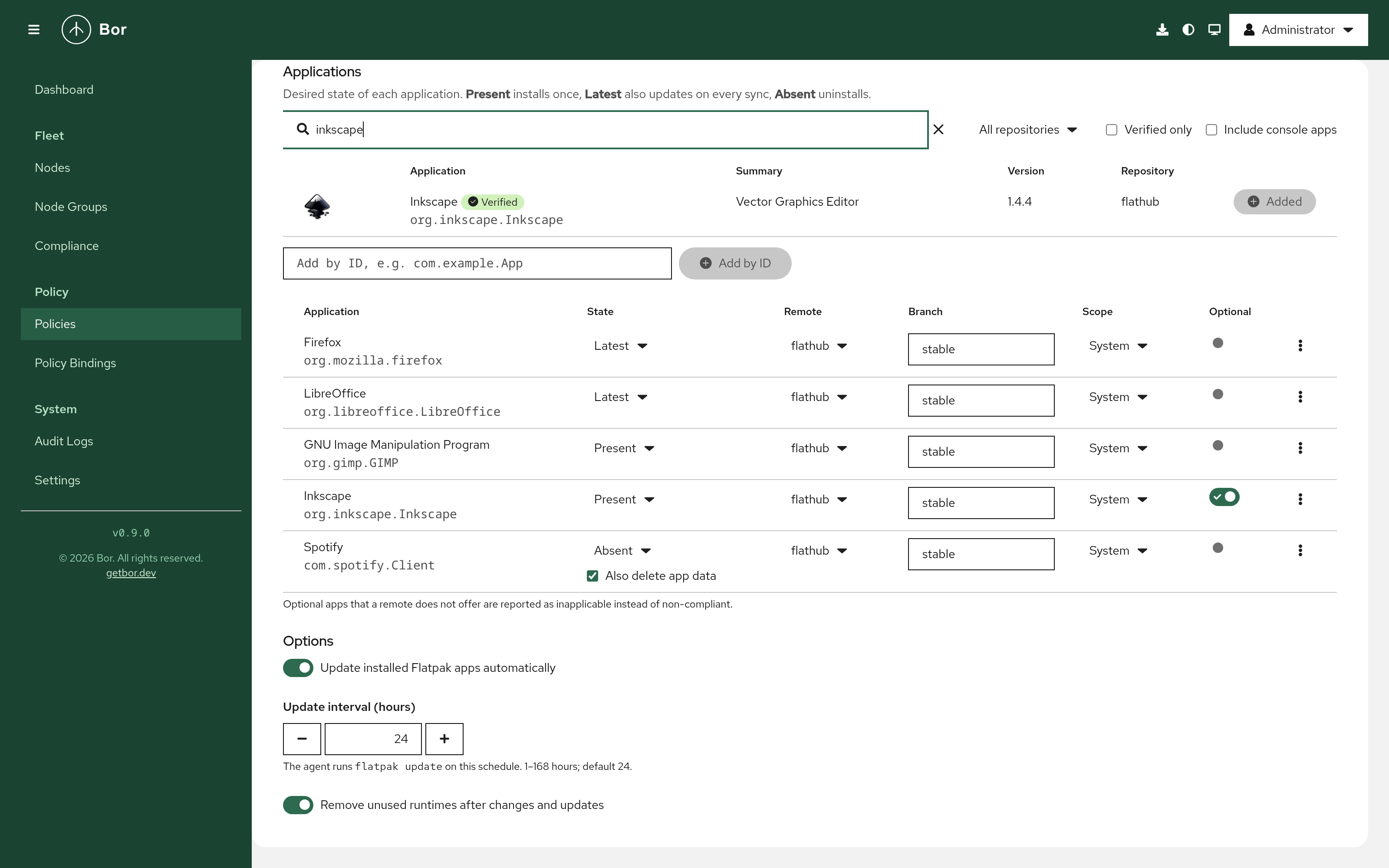
The catalog comes with new flatpak_repo:* permissions (backfilled onto every role that holds settings:manage) and the server settings BOR_FLATPAK_CATALOG_REFRESH, BOR_FLATPAK_CATALOG_MAX_DOWNLOAD_MB and BOR_FLATPAK_CATALOG_ALLOW_PRIVATE_NETWORKS. The agent gained an optional flatpak: config section. See the Flatpak guide.
Instance-hosted agent packages and deploy wizard
Every Bor server now ships and serves the agent packages itself, so managed nodes never need internet access to install or upgrade the agent.
- The
bor-serverpackages and the container image embed thebor-agentpackages for all formats (deb, rpm, apk, Arch) and architectures (amd64, arm64, ppc64le) under/usr/share/bor/agent-repo, assembled and GPG-signed at release build time. - The server serves them at
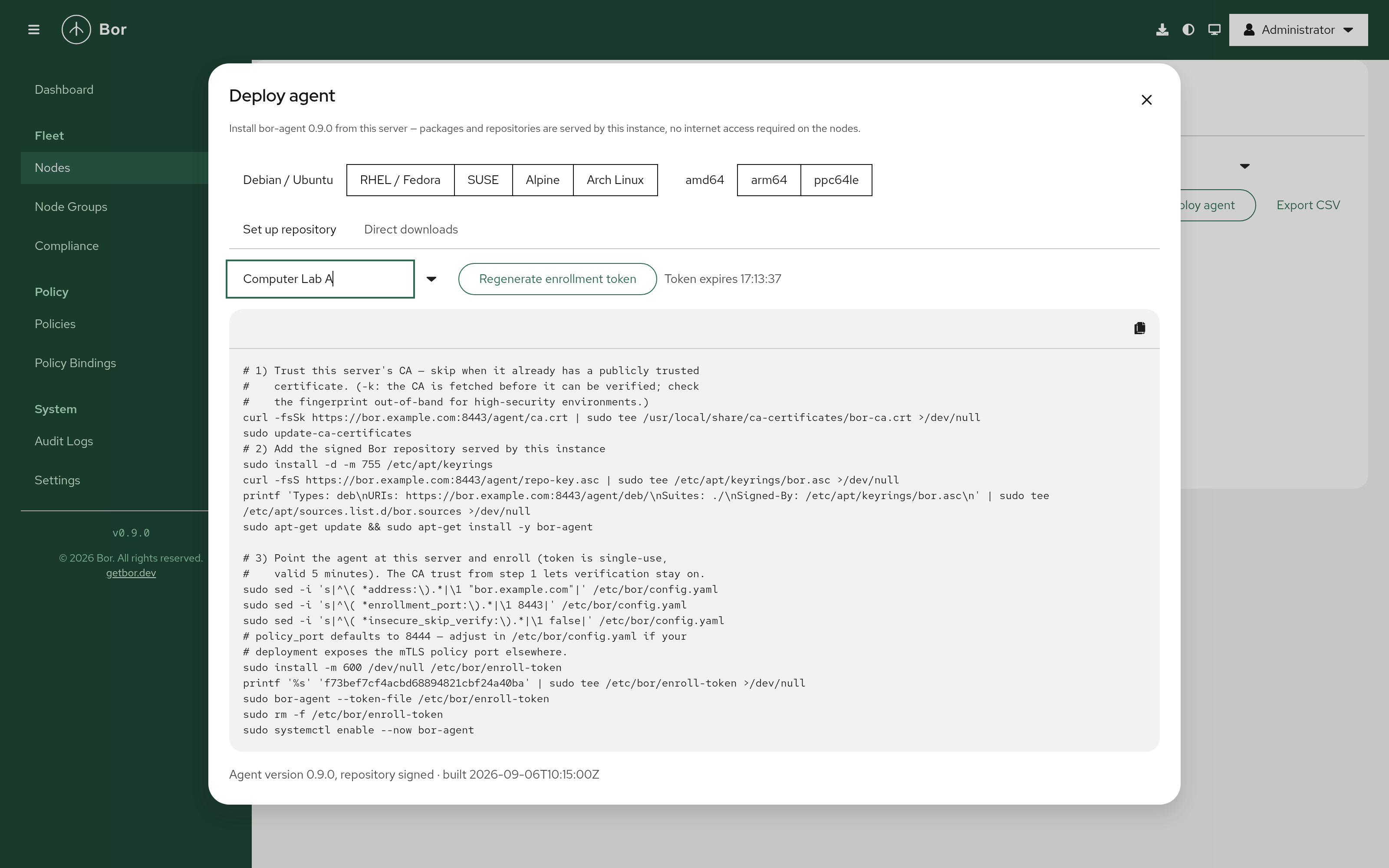
/agent/*: a signed flat apt repository (/agent/deb), a signed dnf/zypper repository (/agent/rpm), direct downloads for Alpine and Arch, the repository signing key (/agent/repo-key.asc), the internal CA certificate (/agent/ca.crt) and a static install page at/agent/. Download endpoints are public by design - package managers cannot authenticate - and files are served through a rooted filesystem with no directory listings. - The Deploy agent wizard (download icon in the masthead, or the button on the Nodes page) asks for the platform (Debian/Ubuntu, RHEL/Fedora, SUSE, Alpine, Arch) and architecture and produces a single copy-paste script that trusts the server CA, sets up the signed repository or downloads the package, and optionally generates a one-time enrollment token inline, so the same script enrolls and starts the agent. A Direct downloads tab lists every package.
- The feature is controlled by the new
BOR_AGENT_REPO_DIRsetting; when the directory holds no manifest,/agent/*returns 404. The server warns at startup when the packaged agent version differs from its own, and a new Prometheus counterbor_agent_package_downloads_total{format,arch}tracks downloads with aggregate labels only.
Policy export and import
Policies can be exported and imported as bor.dev/v1 YAML bundles - for backups, migration between servers, and keeping policies in version control. The format is a Kubernetes-style envelope: one Policy or PolicyBinding document per YAML document, with bindings referencing policies by slug or display name and node groups by name, never by UUID, so bundles are portable across servers.
Export works from the Policies list - a single policy from its kebab menu, or several selected policies as one bundle with their bindings. Import always runs a dry run first and shows a preview of what would be created, updated, skipped or rejected; nothing is written until confirmed, and a bundle with any invalid document is rejected as a whole. Export requires policy:view, import requires policy:create, and both are audited.
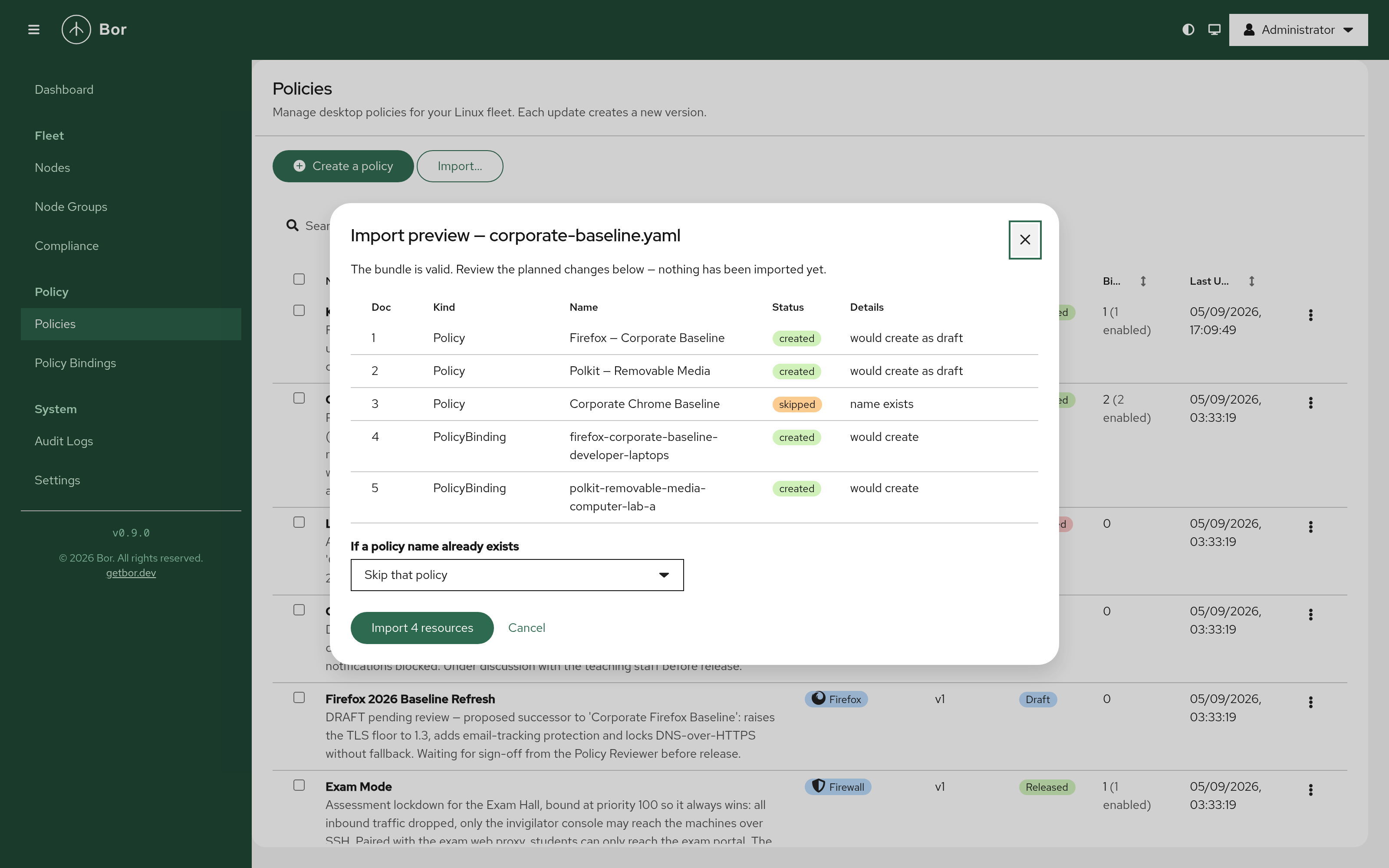
The format, the alternatives that were rejected, and the reasoning behind the import rules are covered in detail in Policies as YAML: the export/import format.
Policy creation wizard
/policies/new is now a four-step wizard: Type (tiles grouped into Browsers / Desktop / System, each with a tagline and description panel), Details, Configuration (the same editor used on the edit page) and Review, with a contextual help drawer on every step after the first. The success screen offers the two things people do next - Release now and Assign to a node group, which opens the binding form with the new policy pre-selected.
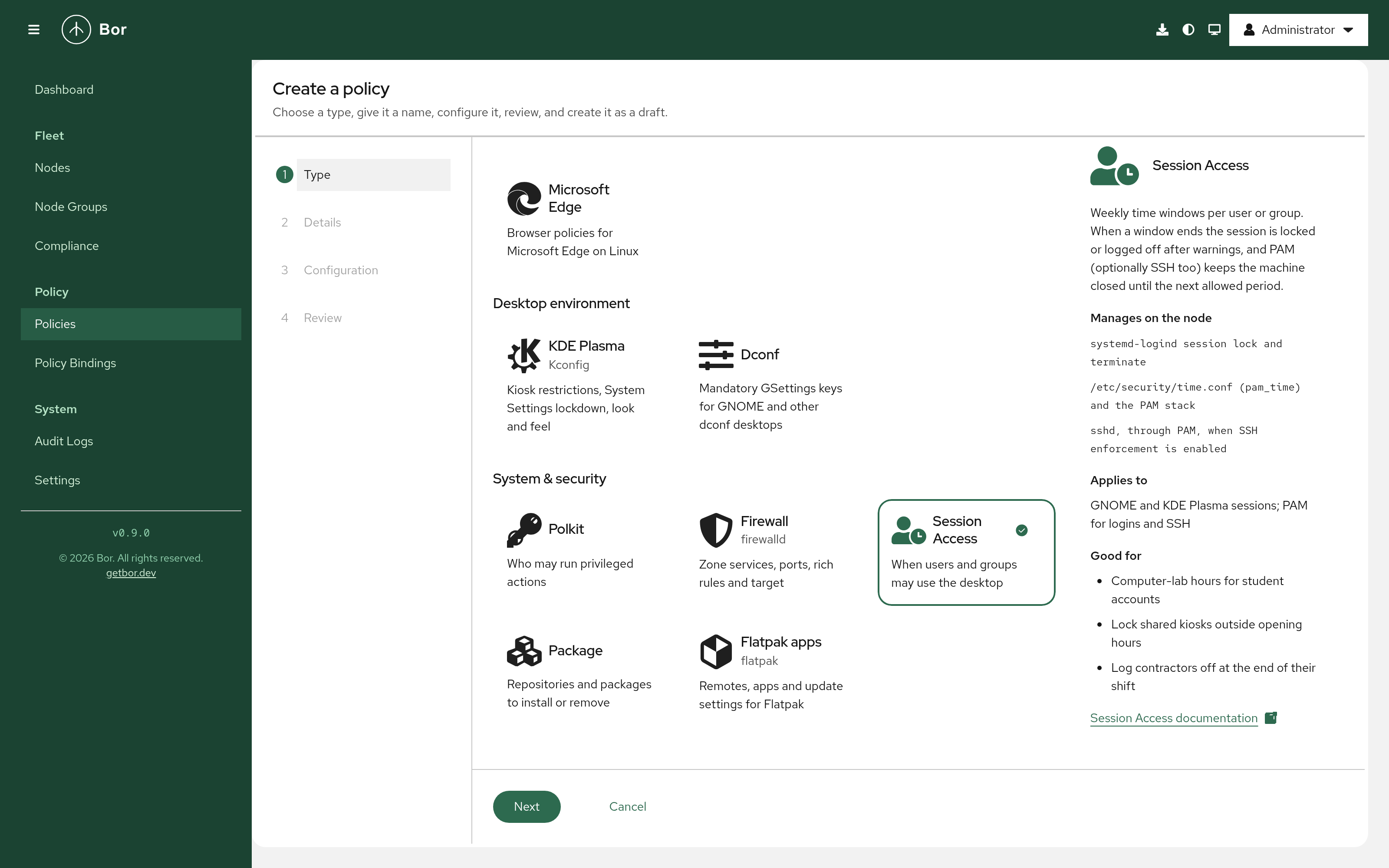
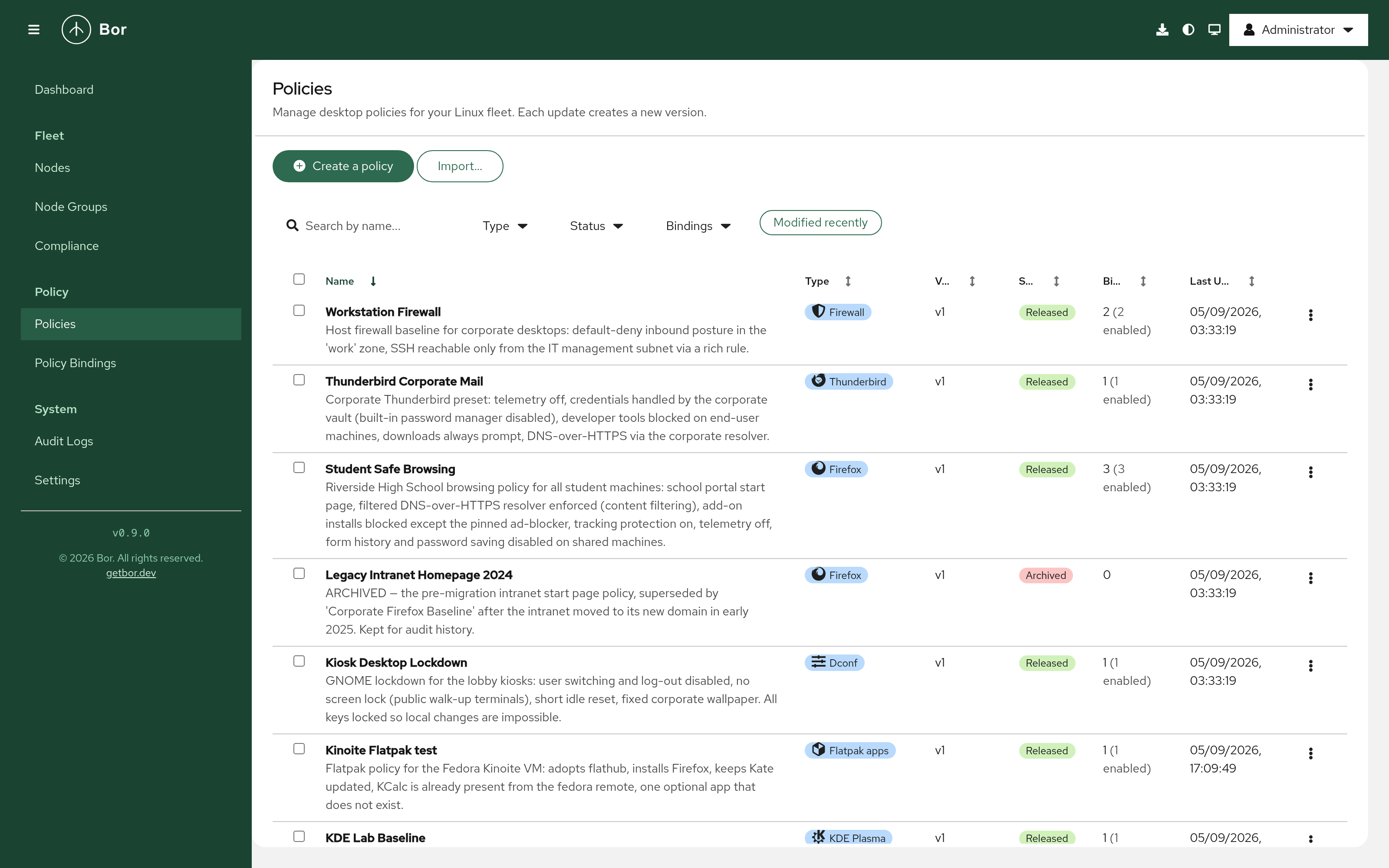
Policy types now have a single registry of labels, taglines, descriptions and icons, shared by the wizard, the Policies list, the dashboard and the bindings page. Firefox, Chrome, Thunderbird, KDE and Flatpak show their brand marks next to the type name. Internally, the monolithic policy editor was split into shared per-type editors, so the wizard and the edit page cannot drift apart.
Readable sidebar and masthead in every theme
The sidebar and masthead are now styled through per-theme semantic properties, so navigation group titles, the current item, the footer and links stay readable in the light, dark and high-contrast themes. Contrast ratios in the light theme are now 7.9:1 for group titles, 9.4:1 for links and 6.6:1 for the footer, where previously some were as low as 1.65:1. This fixes #138. De-emphasized text such as policy descriptions and meta rows is standardized on a theme-aware subtle token.
Security
- Flatpak catalog SSRF hardening (CodeQL
go/request-forgery) - admin-supplied repository URLs are validated with a strict https-only pattern; loopback, unspecified, link-local, multicast and broadcast addresses are always refused, private and CGNAT ranges are refused unless explicitly allowed, and the transport resolves names itself and dials only approved addresses (DNS pinning), TLS 1.2 minimum. - Agent package downloads are served through an
os.Root-scoped filesystem, so path traversal and symlink escapes are structurally impossible. Directories are never listed,X-Content-Type-Options: nosniffis set, and only public material (CA certificate, signing public key) is exposed. - Release signing - the agent repository signing key may now be passphrase-protected; the passphrase is read from the environment only and never passed on a command line.
- Dependabot - all open alerts resolved, including the gRPC-Go HTTP/2 DATA-frame memory exhaustion advisory (GHSA-vp52-pcj8-j9qc), five
fast-urihost-confusion/SSRF advisories, and bumps tobrowserslist,brace-expansion,js-yaml,nanoidandpostcss-selector-parser.
Bug fixes
- Dashboard: nodes without a group and the per-group online/offline tiles are now computed from the many-to-many
node_group_idsarray. Previously every node was reported as unassigned and the group tiles stayed empty. A node in several groups is counted in each. - Policies: the Polkit editor no longer crashes on rules created through the API, where protojson omits empty
action_ids,action_prefixesoraction_conditionsarrays. - Agent: the systemd unit sets
TimeoutStopSec=120, so long-running enforcement steps such as Flatpak installs can wind down cleanly on stop. - Compose: the
BOR_VERSIONbuild argument sets the version shown in the sidebar and at/api/v1/version.
Platform updates
Server and agent moved to gRPC 1.83.2, golang.org/x/crypto 0.55.0 and golang.org/x/net 0.58.0, and the frontend to react-router 8.3.1. The CI pipeline gained an Assemble Agent Repo stage between the agent and server package builds, and the container image embeds the assembled repository. New metrics cover the Flatpak catalog and agent package downloads; see docs/metrics.md.
Upgrade notes
- Agents must be upgraded to v0.9.0 to enforce the new SessionAccess and Flatpak policy types; older agents ignore policy types they do not understand. The new deploy wizard is the easiest way to roll the upgrade out from the server itself.
- Database migration
000029_flatpak_catalogruns automatically at server start and adds the Flatpak catalog tables, theflatpak_repo:*permissions and the seeded Flathub repository. - The protobuf policy schema gained
session_access.protoandflatpak.proto(policy fields 20 and 21) and a newproto/export/export.proto- regenerate any external tooling built againstproto/. - New server settings:
BOR_AGENT_REPO_DIR,BOR_FLATPAK_CATALOG_REFRESH(set tofalseon air-gapped servers; catalog uploads still work),BOR_FLATPAK_CATALOG_MAX_DOWNLOAD_MBandBOR_FLATPAK_CATALOG_ALLOW_PRIVATE_NETWORKS. - Servers built from source, or from a container build that did not run the release pipeline, contain no agent repository; the deploy wizard and
/agent/*stay off until a packaged build is installed. - SessionAccess Layer 2 (
pam_time) requiressystemd-logindand PAM on the node. On authselect-managed Fedora/RHEL a one-time admin step is needed, and the agent reports the policy as degraded until it is done.
Download
Packages for Debian/Ubuntu, RHEL/Fedora/SUSE, Alpine Linux, and Arch Linux across x86_64, aarch64, and ppc64le are available on the Download page. All of the above is also running on the demo instance.